
How to connect to RoboForex CopyFX
Complete guide: from registration via the referral link to running trade copying on our Team Quantum master accounts.
Use the code or the direct link at registration to get our terms and support.
FOREX · MT4 / MT5 · AUTOMATIC COPYING
- 1
Sign up at RoboForex
Open the website via our referral link or enter code dtas at registration. Provide real details — they will be required for verification.
- 2
Pass verification (KYC)
Upload a passport scan and proof of address (document no older than 3 months). Verification takes from 1 hour to 2 business days.
- 3
Open a CopyFX Investor account
In the dashboard: Open an Account → CopyFX → Investor (Pro-Standard, ECN or Prime). Pick MT4 or MT5 — copying works on both. In the Partner's Agent ID field enter dtas and click Apply.
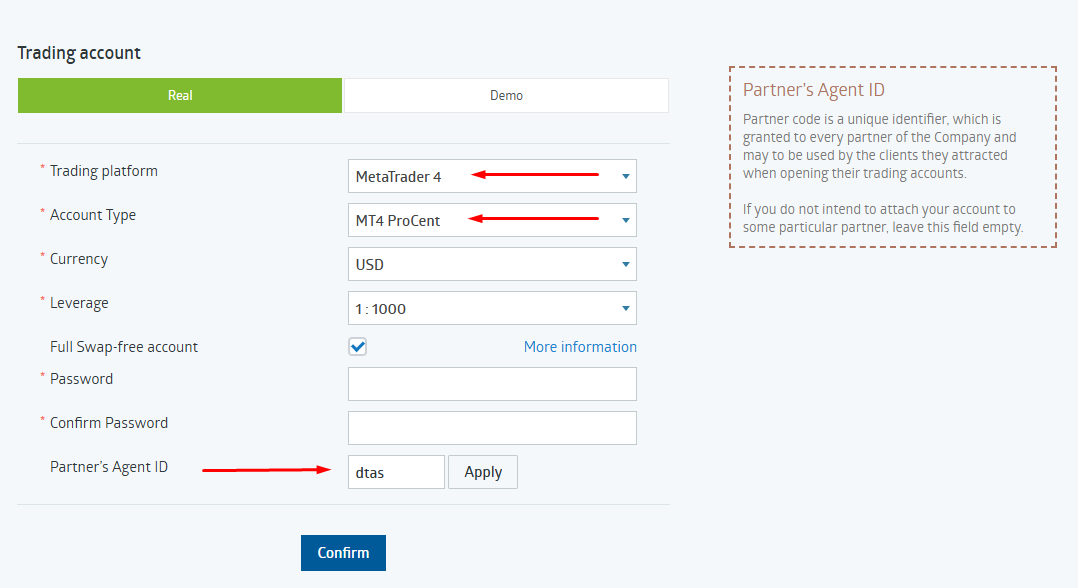
Example: select MetaTrader 4, account type, and enter agent code dtas. - 4
Top up at least $100
Card, SEPA, crypto or e-wallets. Deposit fees are 0–2% depending on the method.
- 5
Subscribe to the Team Quantum master account
Open CopyFX → Investor → Find a Trader, find the account by number or use a direct link below. Click Subscribe and fill in the dialog:
- Copy mode — select Proportional
- Coefficient — enter 0.9
- Click Subscribe to confirm.
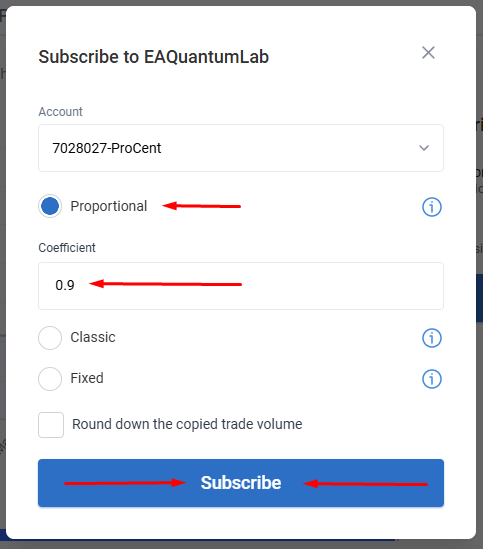
Example: Proportional mode, coefficient 0.9.
OUR MASTER ACCOUNTS
CopyFX lets you set a max lot, an equity stop-loss and a limit on simultaneous positions. All parameters can be changed in real time. Funds stay on your personal broker account — the master has no access to withdrawals or to managing your deposit. You can unsubscribe at any time in one click.
CHOOSE A STRATEGY
Flagship compounding account on index CFDs and futures.
24/7 momentum trading on BTC, ETH and top altcoins.
Conservative metals strategy with drawdown inside 5%.
Open a RoboForex CopyFX account and subscribe to any Team Quantum strategy.